How to Manage MRP Lead Times With Live PO Data
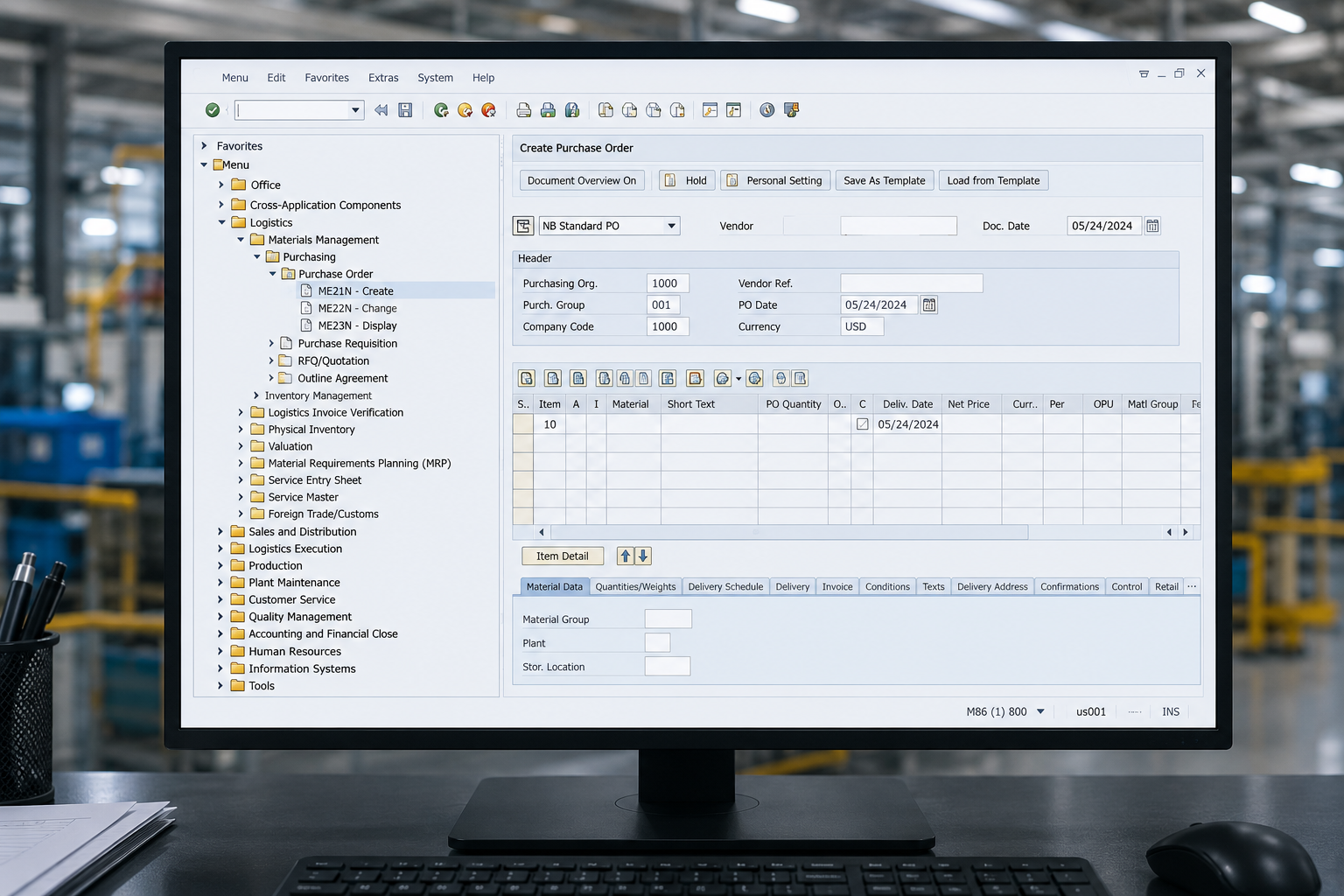
MRP: Make-believe Resource Planning. That's what it becomes when the lead times in your item master haven't been updated since the last trade show.
Here's the bottom line: if your MRP lead times come from static master data, your planned orders are wrong. The fix is straightforward — calculate lead times from live Purchase Order (PO) transaction data, not from a number someone typed into the item master two years ago.
You already know this is a problem. You've watched MRP suggest a start date that's physically impossible. You've expedited parts that should have been ordered three weeks earlier. The root cause is the same every time: the lead time in the system doesn't match the lead time in reality.
The reality is, there's a clear path from broken to fixed. Think of it as Good, Better, Best.
Why Master Data Lead Times Fail
Master data is static. The supply chain is not.
The same part from two different suppliers can have wildly different lead times. But your item master stores one number. One. That number becomes the planning assumption for every planned order, every MRP run, every schedule.
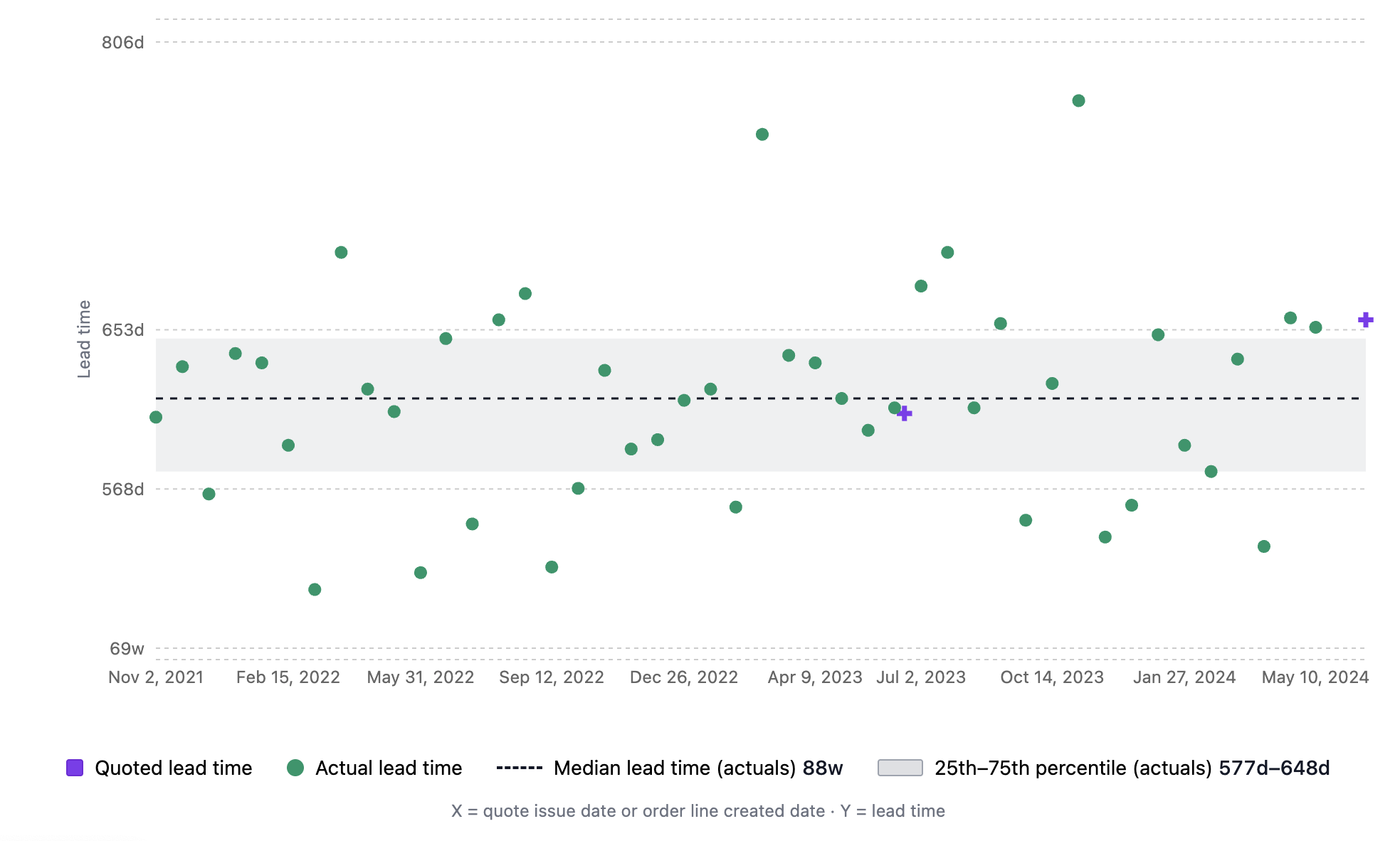
Here's what happens when you look at actual transaction data: lead times scatter across a massive range. In one Silkline customer's Lead Time Analysis, the median actual lead time for a single part was 88 weeks, with the 25th-to-75th percentile spread spanning 577 to 648 days (Silkline platform data). That variance is invisible when you plan off a single static number.
As Tim Dietrich argues in Master Data in Manufacturing, incorrect lead times on an item master cause systematic MRP scheduling errors across every planned order for that item.
One bad number. Every planned order affected. That's not a rounding error — it's a structural planning failure.
Good: Track Vendor-Demonstrated Lead Time (VDLT)
Vendor-Demonstrated Lead Time (VDLT) is the median of actual deliveries per supplier, per part. It replaces the fiction in your item master with measured reality.
How to start this week:
- Export 12 months of PO receipts from your ERP.
- Calculate the median actual lead time for each part-supplier combination.
- Compare each VDLT to the corresponding item master lead time.
- Flag every part where variance exceeds 20%.
The key insight: VDLT must be supplier-specific. A casting from Supplier A and the same casting from Supplier B are two different lead time profiles. Your item master treats them as one. That's where the planning error starts.
Six to twelve months of PO history gives you a reliable baseline. Start there. Across Silkline customer implementations, we typically see 30–50% of item master lead times are off by more than 20% when benchmarked against actual PO receipts (Silkline internal benchmark) — meaning MRP has been scheduling those parts wrong every cycle.
Better: Automate and Account for Hidden Time
Manual VDLT tracking works, but it doesn't scale and it misses hidden lead time that MRP never sees.
The invisible lead time MRP ignores: Purchase Requisition (PR) to PO conversion time. If your average PR-to-PO cycle is 5 days, that's 5 days of unplanned lead time on every order. MRP doesn't account for it. Neither does your item master.
Automate and add offsets:
- Capture lead times automatically from PO transactions — no manual logging.
- Add lead time offsets for receiving, inspection, quarantine, and internal transit.
- Include PR-to-PO conversion time as a planning offset.
- Auto-flag when VDLT drifts more than 20% from master data.
Old Way vs. New Way
Teams that add PR-to-PO time and receiving offsets typically uncover 5–15 additional days of lead time per order that MRP was never planning for. One Silkline customer reduced planned order reschedules by 34% within 60 days of switching from static master data to automated VDLT with offsets (Silkline internal benchmark).
Best: Risk-Adjusted, Criticality-Weighted Lead Times
Once you have reliable VDLT with offsets, the next step is risk-adjusting by part criticality.
Use the standard deviation of your VDLT data to set confidence intervals. Then apply different planning percentiles based on how critical the part is:
- Critical-path items (long-lead, single-source, BOM-critical): Plan at P75 or P90. You need the buffer.
- Standard items: Plan at median (P50). Balanced risk.
- Low-criticality items (commodity, multi-source): Plan at P25. Free up cash and reduce excess inventory.
When You Have No History for a Specific Part
New Parts and New Product Introduction (NPI) are the hardest case. No PO history means no VDLT. Here's the fix: fall back to commodity code.
Castings behave like castings. Machined housings behave like machined housings. Use commodity-level VDLT as a proxy until part-level data accumulates. This solves for new parts, new suppliers, and NPI programs where you're flying blind.
Use the data with suppliers. Show them their VDLT vs. their quoted lead time. It's a conversation starter, not an accusation. Most suppliers don't know their own demonstrated lead time. When you share the data, the discussion shifts from opinion to evidence.
Start Without Software: A Quick-Win Checklist
You don't need a platform to take the first step. Here's what you can do this week with your existing ERP data:
- Export the last 12 months of PO receipts (PO creation date + goods receipt date).
- Calculate median actual lead time for each part-supplier combination.
- Compare each median to the item master lead time. Flag anything with >20% variance.
- Pull a report of PR approval dates vs. PO creation dates. Calculate average PR-to-PO cycle time.
- Add receiving and inspection cycle times from your warehouse data to get a total planning lead time.
That exercise alone will surface the biggest gaps in your MRP assumptions.
How to Automate This at Scale
Spreadsheet-based VDLT tracking works for the first pass, but it breaks when you need continuous updates across hundreds of parts and dozens of suppliers. Automation solves three problems manual tracking can't: it captures lead times from every PO transaction without manual logging, it keeps the data current as new receipts arrive, and it makes the variance visible through percentile bands rather than buried in a spreadsheet tab.
Silkline is purpose-built for this workflow:
- Lead Time Analysis visualizes actual vs. quoted lead times over time with percentile bands — the same data you'd calculate manually, updated continuously.
- AI Quote Extraction pulls quoted lead times from PDF supplier quotes, eliminating re-keying.
- Automated check-ins capture updated ETAs from suppliers via email. Suppliers reply to a plain email — no portal, no login, no behavior change.
- Supplier Scorecards tie On-Time Delivery (OTD) performance to VDLT, so lead time reliability and delivery performance live in one view.
- PR-to-PO tracking measures the internal cycle time MRP ignores.
The key design principle: suppliers don't adopt new software or create accounts. Data flows through email. That's what makes adoption stick at scale.
Start Fixing Your MRP Lead Times This Week
Your item master is not a source of truth for lead times. It's an artifact of the last time someone had time to update it. Live transaction data is the source of truth.
The path is clear:
- Start with VDLT. Export PO receipts, calculate median lead times per part per supplier, flag the gaps.
- Add offsets. PR-to-PO time, receiving, inspection, quarantine. Measure the hidden lead time MRP doesn't see.
- Risk-adjust by criticality. P90 for critical-path items, median for standard, P25 for commodities. Use commodity codes as a proxy for new parts.
If you want lead time visibility calculated automatically from every PO — without building spreadsheets or begging for ERP customizations — here's how teams set it up in under a week.
About Silkline
Silkline is the supply chain orchestration platform that advanced manufacturing companies use to collaborate with suppliers; track requests, RFQs, quotes, and orders; and monitor team and vendor performance. Our technology sets the standard for how OEMs engage their supply base and is the connective layer for hard tech supply chains. Hundreds of advanced manufacturers use Silkline to operate more efficiently and speed up time to revenue. The company is headquartered in Chicago, IL. For additional information, visit https://www.silkline.ai.
© 2026 Silkline, Inc. All rights reserved. Silkline and the Silkline logo are trademarks of Silkline, Inc. All other brand and product names are trademarks or registered trademarks of their respective holders.